ANNOUNCE: ECTool.efi for the Framework Laptop
ECTool.efi is a tool for communicating with the embedded controller in the Framework
Laptop (and potentially other devices with ChromeOS-derived embedded controllers) from the
UEFI shell.
ECTool is part of a suite of tools for the Framework Laptop.
I primarily wrote ECTool to allow somebody to reflash their Embedded Controller safely1 from a pre-boot environment. This first release, therefore, only has a few firmware-related subcommands implemented.
Prebuilt binaries are available on the releases page of the GitHub repository.
Installation⌗
ECTool is distributed in an archive containing a minimal EFI shell. Extract the entire archive to the root of a FAT32-formatted USB mass storage device, copy your desired firmware image to the root of the same device, turn off Secure Boot, and boot from it.
Reflashing your Firmware⌗
Make sure that ECTool can communicate with your embedded controller:
Shell> ectool version
This should report something like…

If it doesn’t, you may want to give up on this endeavor and file a bug report!
Take a backup (optional but recommended, especially if you have an external programmer in case things go terribly.)
Shell> ectool flashread 0 524288 fs0:\ec-backup.bin
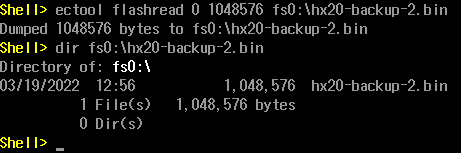
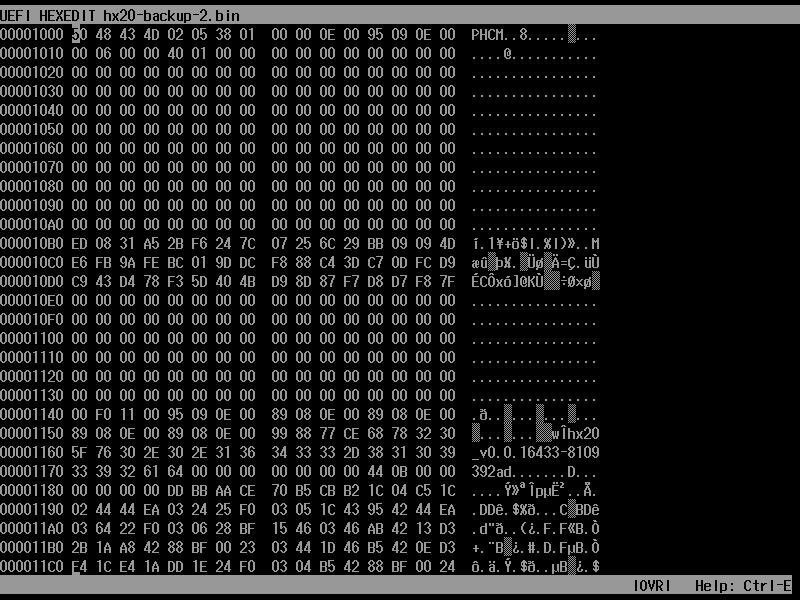
If you’re running a full UEFI shell (sorry, the one in the archive is built to be particularly tiny), you can verify the
flash dump with hexedit fs0:\ec-backup-bin. It will look something like this at offset 0x1000. To quickly jump
to an offset, use Ctrl+G.
Finally, reflash. reflash will only flash 512kb firmware images, and only if the system is currently powered and
charged to 20% or more. The power button will (should?) be disabled for the duration of the flash, which will take about
a minute.
It is delightfully verbose.
Shell> ectool reflash fs0:\new-ec.bin
*** STARTING FLASH (PRESS ANY KEY TO CANCEL)
7...6...5...4...3...2...1...
Unlocking flash... OK
Erasing RO region... OK
Erasing RW region... OK
Writing RO region... OK
Writing RW region... OK
Verifying: Read... OK. Check... RO OK... RW OK... OK
Locking flash... OK

Looks like it worked?
Consider running `ectool reboot` to reset the EC/AP.
-
ectool(from the upstream CrOS EC project) can read/write flash with the OS running, but some ACPI methods are implemented by way of EC host commands. Having one of those interrupt a firmware update would likely be catastrophic. ↩︎